
Introduction
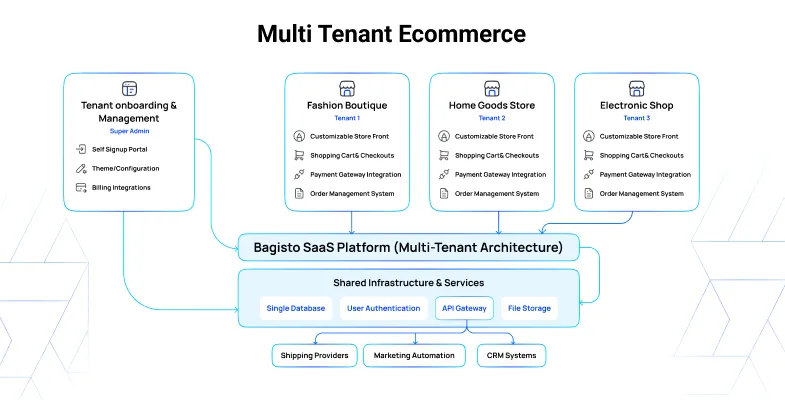
Multi-Tenant eCommerce in Bagisto lets you run a SaaS platform where many merchants create and manage their own individual stores under a single system. Each merchant — a tenant — gets a dedicated storefront and admin panel, while you, the platform owner, manage the infrastructure, subscription plans, and revenue from one place.
What you'll learn
- Who the two audiences of the platform are
- The two types of multi-tenant setup: single database and multiple databases
- What a super admin controls and what a tenant controls
- Where to go next for each task
Two panels, two audiences
The platform is run from two separate panels.
- The Super Admin panel is where you oversee every tenant, subscription plan, and platform-wide setting.
- The Tenant Admin panel is a Bagisto-like backend each merchant uses to run their own store.
Two types of multi-tenant setup
The module comes in two variants. Both give every tenant its own storefront, admin panel, and isolated store data — the difference is where that data is stored.
- Single Database — all tenants share one database and are separated by a tenant identifier. Cheapest and simplest to maintain, and a good fit for many smaller stores.
- Multiple Databases — each tenant gets its own dedicated database, created when the merchant registers. Strongest isolation, with per-tenant backups and independent scaling.
Everything else in this guide — panels, plans, tenants, and settings — works the same way in both variants.
What the super admin does
The super admin is the top authority on the platform. From the Super Admin panel you can:
- Manage tenants — register merchants, view their store insights, edit them, and sign in as any tenant. See Tenant Management.
- Sell subscriptions — create plans, track purchased plans, and review invoices. See Plan Management.
- Run the platform — manage agents and roles, currencies, exchange rates, webhooks, and themes. See Agents & Roles.
- Publish content — manage CMS pages and platform-wide configuration. See CMS Pages.
What a tenant does
A tenant signs up, gets a storefront and admin panel provisioned automatically, and starts selling. A merchant manages products, categories, orders, and customers, chooses a storefront theme allowed by their plan, and reviews their own subscription and invoices. See Registration & Sign-in.
TIP
New to the platform? If you run the SaaS, start with the Super Admin Dashboard. If you're a merchant setting up a store, start with Registration & Sign-in.